
FW 07.00.00/HAFM SW 08.06.00 McDATA Intrepid 6064 Director Installation and Service Manual (620-000108-920, April 2005)

5
5-12
Intrepid® 6064 Director Installation and Service Manual
Removal and Replacement Procedures (RRPs)
1. Notify the customer that all ports on the defective port card will
be blocked. Ensure the customer system administrator quiesces
Fibre Channel frame traffic through any operational ports on the
card and sets attached devices offline.
2. If the director is installed in a stand-alone configuration, go
to step 3. If the director is rack-mounted, perform one of the
following:
— If the director is installed in a McDATA-supplied FC-512
Fabricenter equipment cabinet, insert the 5/16" door tool into
the socket hole at the right top of the front door. Turn the tool
counter-clockwise to unlock and open the door.
— If the director is installed in a customer-supplied equipment
cabinet, unlock and open the cabinet front door as directed by
the customer representative.
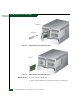
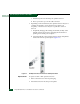
3. Follow ESD procedures by attaching a wrist strap to the director
chassis and your wrist (Figure 5-1).
ATTENTION! To avoid causing machine errors or damage while working on
the director, follow ESD procedures by connecting a grounding cable to the
director chassis and wearing an ESD wrist strap.
4. Identify the defective port card from the amber LED on the card
or failure information at the management server Hardware View.
5. Block communication to the defective port card (Blocking and
Unblocking Ports on page 4-46).
6. Disconnect the fiber-optic jumper cable from each port on the
defective card as follows. Repeat this step for all four ports.
a. Pull the keyed LC connector free from the port optical
transceiver.
b. Place a protective cap over the cable connector. If required,
label jumper cables to ensure correct connections when the
port card is replaced.
NOTE: If name server zoning is implemented by port number, a
change to the director fiber-optic cable configuration disrupts zone
operation and may incorrectly include or exclude a device from a
zone.
c. Insert a protective plug into the optical transceiver.