
FW 07.00.00/HAFM SW 08.06.00 McDATA Intrepid 6064 Director Installation and Service Manual (620-000108-920, April 2005)

5
RRP: Port Module Card (UPM and XPM)
5-13
Removal and Replacement Procedures (RRPs)
ATTENTION! When fiber-optic cables are disconnected from port card
optical transceivers, ensure protective plugs are inserted into the receptacles.
This prevents damage to sensitive components and prevents injury to the eye
if the laser is viewed directly.
7. The port card is secured to the director chassis with two captive
Allen screws. The bottom screw is spring-loaded and locks the
port card in place. The top screw cams the port card into and out
of the backplane.
ATTENTION! The torque tool supplied with the Intrepid 6064 Director is
designed to tighten director logic cards and is set to release at a torque value
of six inch-pounds. Do not use an Allen wrench or torque tool designed for
use with another McDATA product. Use of the wrong tool may overtighten
and damage logic cards.
a. Insert the torque tool into the locking Allen screw at the
bottom of the card. Turn the screw counter-clockwise until the
spring releases and the tool turns freely.
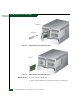
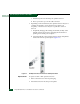
b. Insert the torque tool into the cam Allen screw at the top of the
card (Figure 5-5 and Figure 5-6). To unseat the port card and
cam it out of the backplane, turn the screw counterclockwise
until the tool turns freely.
8. Pull the port card from its card track and remove it from the
director chassis. Place the card in an anti-static bag to provide
ESD protection.