
FW 07.00.00/HAFM SW 08.06.00 McDATA Intrepid 6064 Director Installation and Service Manual (620-000108-920, April 2005)

5
RRP: Port Module Card (UPM and XPM)
5-15
Removal and Replacement Procedures (RRPs)
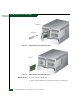
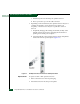
2. Hold the card by its stiffener and insert it in the chassis card track
(Figure 5-5). The label identifying the card should be at the top.
Verify the card is aligned in the card tracks, then slide it forward
until it makes contact with the backplane.
3. Secure the port card:
a. Insert the torque tool into the cam Allen screw at the top of the
card. Turn the torque tool clockwise until you feel it release
and hear a clicking sound. As the screw turns clockwise, the
card cams into the backplane connector.
b. Insert the torque tool into the locking Allen screw at the
bottom of the card. Turn the torque tool clockwise until you
feel it release and hear a clicking sound. As the screw turns
clockwise, the card locks into place.
c. Verify the card stiffener is flush with the front of the card cage
and even with other director logic cards.
4. Perform an external loopback test for all ports on the replacement
port card (Performing Port Diagnostic Loopback Tests on page 4-30).
If the test fails, go to MAP 0000: Start MAP on page 3-9 to isolate
the problem.
5. Reconnect a fiber-optic jumper cable to each port on the card as
follows. Inspect the label on the jumper cable to ensure the correct
connection. Repeat this step for all four ports.
a. Remove the protective cap from the cable connector and the
protective plug from the port optical transceiver. Store the cap
and plug in a suitable location for safekeeping.
b. Clean the cable and port connectors (Cleaning Fiber-Optic
Components on page 4-51).
c. Insert the keyed LC cable connector into port optical transceiver.
6. Disconnect the ESD wrist strap from the director chassis and your
wrist.
7. Inspect the port card to ensure all amber LEDs are extinguished.
If any amber LEDs are illuminated, go to MAP 0000: Start MAP on
page 3-9 to isolate the problem.
8. At the management server or at a web browser connected to the
SANpilot interface, inspect the Event Log. Ensure the following
event codes appear in the log:
— 500 - Port card hot-insertion initiated.