
FW 07.00.00/HAFM SW 08.06.00 McDATA Intrepid 6064 Director Installation and Service Manual (620-000108-920, April 2005)


5
RRP: Filler Blank (UPM and XPM)
5-21
Removal and Replacement Procedures (RRPs)
— If the director is installed in a customer-supplied equipment
cabinet, unlock and open the cabinet front door as directed by
the customer representative.
2. Identify the filler blank to be removed.
3. The filler blank is secured to the director chassis with two captive
Allen screws. Both screws are spring-loaded to lock the filler
blank in place.
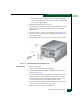
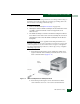
4. Insert the torque tool into each locking Allen screw (Figure 5-8).
Turn each screw counter-clockwise until the spring releases and
the tool turns freely.
5. Pull the filler blank out and remove it from the director chassis.
Figure 5-8 Filler Blank Removal and Replacement
Replacement To replace a filler blank:
1. Remove the filler blank from its packaging.
2. Hold the filler blank by its stiffener and insert it in the chassis
card track (Figure 5-8).
3. To secure the filler blank, sequentially insert the torque tool into
each locking Allen screw. Turn each screw clockwise until you
feel the torque tool release and hear a clicking sound. As each
screw turns clockwise, the filler blank locks into place.
4. Verify the filler blank stiffener is flush with the front of the card
cage and even with other director logic cards.
5. Close and lock the equipment cabinet door.