
FW 07.00.00/HAFM SW 08.06.00 McDATA Intrepid 6064 Director Installation and Service Manual (620-000108-920, April 2005)


5
RRP: RFI Shield
5-25
Removal and Replacement Procedures (RRPs)
a. Click the Switch tab at the Operations panel. The Operations
panel opens with the Switch page displayed.
b. Click the Sys Err Light tab. The Switch page displays with
the Sys Err Light tab selected. A System Error Light is ON
message displays on the page.
c. Click Clear Light.
11. If necessary, close and lock the equipment cabinet door.
RRP: RFI Shield
Use the following procedures to remove or replace the rear RFI
shield. A list of tools required is provided.
Tools Required The following tools are required to perform these procedures.
• Door key with 5/16-inch socket (provided with the FC-512
Fabricenter equipment cabinet).
• Standard flat-tip screwdriver.
Removal To remove the RFI shield:
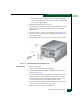
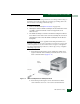
1. Five captive screws (three upper and two lower) secure the RFI
shield to the chassis (Figure 5-10). Using a flat-tip screwdriver,
loosen all five captive screws until they release. Loosen the top
center screw last.
2. Pull the RFI shield away from the director chassis.
.
Figure 5-10 RFI Shield Removal and Replacement