
FW 07.00.00/HAFM SW 08.06.00 McDATA Intrepid 6064 Director Installation and Service Manual (620-000108-920, April 2005)


5
5-26
Intrepid® 6064 Director Installation and Service Manual
Removal and Replacement Procedures (RRPs)
Replacement To replace the RFI shield:
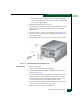
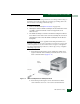
1. Position the RFI shield at the rear of the director chassis
(Figure 5-10).
2. Align the five captive screws with the director chassis anchor
points. Using a flat-tip screwdriver, tighten all five screws.
Tighten the top center screw first.
RRP: SBAR Assembly
Use the following procedures to remove or replace an SBAR assembly
(two assemblies in the director) with the backup SBAR assembly
operational. A list of tools required is provided.
Tools Required The following tools are required to perform these procedures.
• Door key with 5/16-inch socket (provided with the FC-512
Fabricenter equipment cabinet).
• Standard flat-tip screwdriver.
• ESD grounding cable and wrist strap.
• Torque tool and hex adapter (provided with the director).
Removal To remove an SBAR assembly:
1. If the director is installed in a stand-alone configuration, go to
step 2. If the director is rack-mounted, perform one of the
following:
— If the director is installed in a McDATA-supplied FC-512
Fabricenter equipment cabinet, insert the 5/16" door tool into
the socket hole at the right top of the rear door. Turn the tool
counter-clockwise to unlock and open the door.
— If the director is installed in a customer-supplied equipment
cabinet, unlock and open the cabinet rear door as directed by
the customer representative.
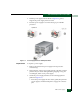
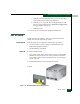
2. Follow ESD procedures by attaching a wrist strap to the director
chassis and your wrist (Figure 5-2).