
FW 07.00.00/HAFM SW 08.06.00 McDATA Intrepid 6064 Director Installation and Service Manual (620-000108-920, April 2005)


5
RRP: SBAR Assembly
5-27
Removal and Replacement Procedures (RRPs)
ATTENTION! To avoid causing machine errors or damage while working on
the director, follow ESD procedures by connecting a grounding cable to the
director chassis and wearing an ESD wrist strap.
3. Remove the RFI shield (RRP: RFI Shield on page 5-25).
4. Identify the defective SBAR assembly from the amber LED on the
assembly or failure information at the management server
Hardware View.
5. The SBAR assembly is secured to the director backplane with two
brass Allen screws. Both screws cam the assembly into and out of
the backplane. Disconnect the SBAR assembly from the director
backplane:
ATTENTION! The torque tool supplied with the Intrepid 6064 Director is
designed to tighten director logic cards and is set to release at a torque value
of six inch-pounds. Do not use an Allen wrench or torque tool designed for
use with another McDATA product. Use of the wrong tool may overtighten
and damage logic cards.
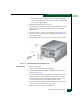
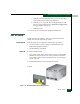
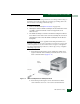
a. Insert the tip of the torque tool into either brass Allen screw
(right or left side of the assembly). Turn the screw one or two
turns counterclockwise (Figure 5-11).
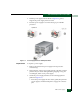
Figure 5-11 SBAR Assembly Removal and Replacement
b. Insert the tip of the torque tool into the other brass Allen
screw. Turn the screw one or two turns counterclockwise.