
FW 07.00.00/HAFM SW 08.06.00 McDATA Intrepid 6064 Director Installation and Service Manual (620-000108-920, April 2005)

5
RRP: Backplane
5-37
Removal and Replacement Procedures (RRPs)
— The Microsoft Windows 98, Windows
2000, Windows
Millennium Edition, or Windows NT 4.0 operating system.
— RS-232 serial communication software (such as ProComm
Plus or HyperTerminal). HyperTerminal is provided with
Windows operating systems.
• Asynchronous RS-232 null modem cable (provided with the
director).
Removal To remove the backplane:
1. At the Hardware View, double-click the graphic representing the
director bezel (do not click a graphical FRU) to open the Director
Properties dialog box. Record the director serial number. This
number must be programmed into the replacement backplane.
If the director is not communicating with the management server
(Director Properties dialog box is not available), obtain the serial
number while performing step 5.
2. Notify the customer that the director will be powered off. Ensure
the customer system administrator quiesces Fibre Channel frame
traffic through the director and sets attached devices offline.
3. If the director is installed in a stand-alone configuration, go to
step 4. If the director is rack-mounted, perform one of the
following:
— If the director is installed in a McDATA-supplied FC-512
Fabricenter equipment cabinet, insert the 5/16” door tool into
the socket hole at the right top of the front door. Turn the tool
counter-clockwise to unlock and open the door. Repeat this
step to open the rear door.
— If the director is installed in a customer-supplied equipment
cabinet, unlock and open the cabinet front door as directed by
the customer representative. Repeat this step to open the rear
door.
4. Power off and unplug the director (Power-Off Procedure on
page 4-53).
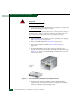
DANGER
Disconnect the power cords.