
FW 07.00.00/HAFM SW 08.06.00 McDATA Intrepid 6064 Director Installation and Service Manual (620-000108-920, April 2005)

5
RRP: Backplane
5-39
Removal and Replacement Procedures (RRPs)
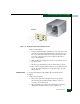
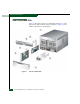
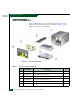
Figure 5-14 Backplane Removal and Replacement
Remove the backplane:
a. Using a standard Phillips screwdriver, loosen and remove ten
of the 11 screws that secure the backplane to the chassis. Loosen
the screws alternately from bottom to top and from side to side.
Leave one of the top center screws in place until ready to
remove the backplane.
b. While holding the backplane in place, loosen and remove the
top center screw.
c. Tilt the top of the backplane away from the director chassis.
d. Remove the backplane (PWA and frame as one FRU) from the
chassis. Place the backplane in an anti-static bag to provide
ESD protection.
Replacement To replace the backplane and all FRUs disconnected from the
backplane:
1. Replace the backplane:
a. Remove the replacement backplane from its protective
anti-static bag. Inspect the backplane PWA to ensure no
connector pins are damaged.
b. Align the guide pins on the back of the backplane with the
alignment holes in the director chassis (Figure 5-14).