
FW 07.00.00/HAFM SW 08.06.00 McDATA Intrepid 6064 Director Installation and Service Manual (620-000108-920, April 2005)

5
5-42
Intrepid® 6064 Director Installation and Service Manual
Removal and Replacement Procedures (RRPs)
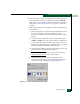
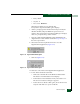
f. Type Intrepid 6064 in the Name field and click OK. The Connect
To dialog box displays (Figure 5-16).
Figure 5-16 Connect To Dialog Box
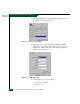
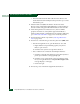
g. Ensure the Connect using field displays COM1 or COM2
(depending on the serial communication port connection to
the director), and click OK. The COMn dialog box displays
where n is 1 or 2 (Figure 5-17).
Figure 5-17 COMn Dialog Box
h. Configure the Port Settings parameters:
• Bits per second - 57600.
• Data bits - 8.