
FW 07.00.00/HAFM SW 08.06.00 McDATA Intrepid 6064 Director Installation and Service Manual (620-000108-920, April 2005)

5
RRP: Backplane
5-43
Removal and Replacement Procedures (RRPs)
• Parity - None.
• Stop bits - 1.
• Flow control - Hardware.
When the parameters are set, click OK. The
Intrepid 6064 - HyperTerminal dialog box displays.
i. At the > prompt, type the maintenance-level password (the
default is level-2) and press Enter. The password is case
sensitive. The Intrepid 6064 - HyperTerminal dialog box displays
with a C> prompt at the top of the window.
j. Type the command oem nnnnnnnn, where nnnnnnnn is the
original director serial number recorded in step 1 or step 5 of
the removal procedure.
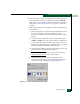
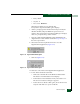
k. Select Exit from the File pull-down menu to close the
HyperTerminal application (Figure 5-18).
Figure 5-18 HyperTerminal Dialog Box
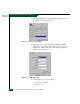
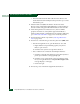
l. Click Yes (Figure 5-19).
Figure 5-19 HyperTerminal Dialog Box
m. Click No to exit and close the HyperTerminal application.
n. Power off the maintenance terminal:
• Click Start at the left side of the Windows 2000 task bar.
The Windows 2000 Workstation menu displays.
• At the Windows 2000 Workstation menu, select Shut Down.
The Shut Down Windows dialog box appears.
• At the Shut Down Windows dialog box, select Shut down the
Computer and click Ye s to power off the PC.