
FW 07.00.00/HAFM SW 08.06.00 McDATA Intrepid 6064 Director Installation and Service Manual (620-000108-920, April 2005)


1
1-16
Intrepid® 6064 Director Installation and Service Manual
General Information
Tools Supplied with
the Director
The following tools are supplied with the director. Use of the tools
may be required to perform installation, test, service, or verification
tasks.
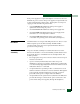
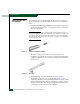
• Torque tool with hexagonal adapter - The torque tool with 5/32”
hexagonal adapter (Figure 1-8) is required to remove and replace
director logic cards.
ATTENTION! The torque tool supplied with the Intrepid 6064 Director is
designed to tighten director logic cards and is set to release at a torque value
of six inch-pounds. Do not use an Allen wrench or torque tool designed for
use with another McDATA product. Use of the wrong tool may overtighten
and damage logic cards.
Figure 1-8 Torque Tool and Hex Adapter
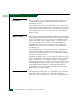
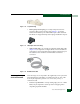
• Door key - The door key with 5/16” socket (Figure 1-9) is
required to open the front or rear door of the FC-512 Fabricenter
equipment cabinet. A 5/16” socket wrench may be used in lieu of
the door key.
Figure 1-9 Door Key
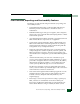
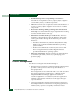
• Loopback plug - An SFP multimode (shortwave laser) or
singlemode (longwave laser) loopback plug (Figure 1-10) is
required to perform port loopback diagnostic tests. One loopback
plug is shipped with the director, depending on the type of port
transceivers installed. Both plugs are shipped if shortwave laser
and longwave laser transceivers are installed.