
FW 07.00.00/HAFM SW 08.06.00 McDATA Intrepid 6064 Director Installation and Service Manual (620-000108-920, April 2005)


1
1-18
Intrepid® 6064 Director Installation and Service Manual
General Information
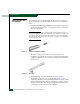
• Standard flat-tip and cross-tip (Phillips) screwdrivers -
Screwdrivers are required to remove, replace, adjust or tighten
various FRUs, chassis, or cabinet components.
• T10 Torx
®
tool - The tool is required to rack-mount the director or
to remove, replace, adjust or tighten various chassis or cabinet
components.
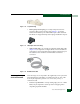
• Electrostatic discharge (ESD) grounding cable with attached
wrist strap - Use of the ESD wrist strap is required when working
in and around the director card cage.
• Maintenance terminal (desktop or notebook PC) - The PC is
required to configure director network addresses and acquire
event log information through the maintenance port. The PC
must have:
— The Microsoft Windows 98, Windows
2000, Windows 2003,
Windows XP, or Windows Millennium Edition operating
system installed.
— RS-232 serial communication software (such as ProComm
Plus™ or HyperTerminal) installed. HyperTerminal is
provided with Windows operating systems.
• Fiber-optic cleaning kit - The kit contains tools and instructions
to clean fiber-optic cable, connectors, loopback plugs, and
protective plugs.
Director Management
The director is managed and controlled through a:
• Management server running a SAN management application that
provides a central point of control for up to 48 directors or
managed products.
The management server is delivered with a server and client SAN
management application (SANavigator or EFCM) and the
Intrepid 6064 Element Manager application installed. A
customer-supplied PC or workstation (with client applications
installed) communicates with the server through a through a
corporate intranet.
• Customer-supplied PC platform with an Internet connection to
the SANpilot interface on the director. Using this graphical user
interface (GUI), operators can quickly view director status.