
FW 07.00.00/HAFM SW 08.06.00 McDATA Intrepid 6064 Director Installation and Service Manual (620-000108-920, April 2005)


E
Restore Management Server Procedure
E-3
Restore Management Server
4. After the restore completes, the server makes a series of beeps.
Remove the Management Server Restore CD-ROM from the CD-RW
drive.
5. Power cycle the server. The server performs power-on self-tests
(POSTs). After successful POST completion, the LCD panel
displays a Welcome!! message, then cycles through and displays
server operational information.
6. Configure the following parameters at the server LCD panel
(Verify the type of LAN installation with the customer network
administrator. on page 2-23).
• LCD panel password.
• IP address for private and public LAN connections.
• Subnet mask or private and public LAN connections.
7. Log on to the server Windows 2000 desktop through a LAN
connection to a browser-capable PC (Access the Management Server
Desktop on page 2-26).
8. Configure Windows 2000 configuration information as required
by the customer:
a. Configure the computer and workgroup names for the server.
If required, change the server gateway address and DNS
server IP address to conform to the customer LAN addressing
plan (Subtask B: Configure Management Server Information on
page 2-25).
b. Change the default Windows 2000 administrator password
and configure password access for authorized users (Subtask
C: Configure Windows 2000 Users on page 2-31).
c. Set the server date and time (Subtask D: Set Management Server
Date and Time on page 2-36).
d. Configure the call-home feature (Subtask E: Configure the
Call-Home Feature on page 2-38).
9. Insert the EFC Management Applications CD-ROM in the CD-RW
drive and close the LCD panel.
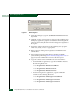
10. At the server Windows 2000 desktop, click Start at the left side of
the task bar, then select the Run option. The Run dialog box
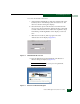
displays (Figure E-1).