
FW 07.00.00/HAFM SW 08.06.00 McDATA Intrepid 6064 Director Installation and Service Manual (620-000108-920, April 2005)


E
E-4
Intrepid® 6064 Director Installation and Service Manual
Restore Management Server
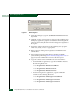
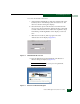
Figure E-1 Run Dialog Box
11. At the Run dialog box, type D:\mcdataServerInstall in the
Open field.
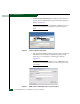
12. Click OK. A series of message boxes appear as the InstallAnywhere
third-party application prepares to install the SAN management
software, followed by the McDATA EFC Management Applications
dialog box.
13. Follow the online instructions for the InstallAnywhere program.
Click Next, Install, or Done as appropriate.
14. Remove the EFC Management Applications CD-ROM from the
CD-RW drive.
15. Insert SAN management data directory backup CD-ROM
(created while performing Task 10: Back Up Configuration Data on
page 2-78) in the CD-RW drive and close the LCD panel.
16. Copy the contents of the CD-ROM to the server hard drive:
• For the EFCM 8.5 application, copy the CD-ROM contents to
the following directories:
— C:\Program Files\EFCM 8.5\CallHome
— C:\Program Files\EFCM 8.5\Client
— C:\Program Files\EFCM 8.5\Server.
• For the Sanavigator 4.1 application, copy the CD-ROM
contents to the following directories:
— C:\Program Files\SANavigator4.1\CallHome
— C:\Program Files\SANavigator4.1\Client
— C:\Program Files\SANavigator4.1\Server.