
FW 07.00.00/HAFM SW 08.06.00 McDATA Intrepid 6064 Director Installation and Service Manual (620-000108-920, April 2005)


2
Task 2: Install the Ethernet Hub
2-11
Installation Tasks
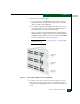
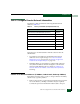
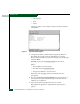
5. To daisy-chain (connect) the hubs:
a. To connect the top and middle hubs in the stack, connect an
RJ-45 patch cable to port 24 of the top hub, then connect the
cable to port 12 of the middle hub.
b. To connect the bottom and middle hubs in the stack, connect a
second RJ-45 patch cable to port 24 of the middle hub, then
connect the cable to port 12 of the bottom hub.
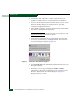
c. Using a pencil or other pointed instrument, set the medium-
dependent interface (MDI) switch on the top and middle hubs
to MDI (in). Set the MDI switch on the bottom hub to MDIX
(out). The configuration is shown in Figure 2-3.
NOTE: To connect two hubs, use step a and step c (top and middle
hub instructions only).
Figure 2-3 Patch Cable and MDI Selector Configuration
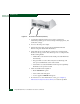
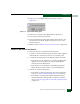
6. Connect an AC power cord to the receptacle at the rear of each
hub and to a rack power strip. Power for each hub switches on
when the hub (and equipment rack) are connected to facility AC
power.