
FW 07.00.00/HAFM SW 08.06.00 McDATA Intrepid 6064 Director Installation and Service Manual (620-000108-920, April 2005)


2
Task 3: Install the Director
2-13
Installation Tasks
Subtask B: Rack-Mount Installation
CAUTION
Use safe lifting practices when moving the product.
Perform the following steps to install the director in a customer-
supplied equipment rack. A #2 Phillips screwdriver is required.
1. Locate the rack-mount position as directed by the customer. The
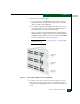
director is 15.75 inches (9U) high.
2. Verify all FRUs, including the SFP and XFP optical transceivers,
logic cards, fans, and power supplies are installed as ordered.
3. Open the rack-mount kit and inspect the contents. Refer to the
enclosed bill of materials and verify all parts are delivered.
4. Using installation instructions delivered with the rack-mount kit
and a #2 Phillips screwdriver, install the director in the equipment
cabinet.
Subtask C: Turn-on Director Power
DANGER
Use the supplied power cords. Ensure the facility power receptacle is
the correct type, supplies the required voltage, and is properly
grounded.
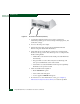
1. Connect the U.S. AC power cords to the right (PS0) and left (PS1)
receptacles at the rear of the director (Figure 2-4).
2. Connect the remaining ends of the AC power cords to separate
(for redundancy) rack power strips.