
FW 07.00.00/HAFM SW 08.06.00 McDATA Intrepid 6064 Director Installation and Service Manual (620-000108-920, April 2005)


2
Task 4: Configure Director Network Information
2-15
Installation Tasks
Task 4: Configure Director Network Information
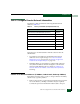
The director is delivered with the following default network
addresses (Table 2-4):
Verify the type of LAN installation with the customer network
administrator.
• If one director is installed on a dedicated LAN, network
addresses do not require change. Go to Task 5: Install the
Management Server on page 2-20 or to Task 11: Configure the
Director at the SANpilot Interface on page 2-80.
• If multiple directors are installed or a public LAN segment is
used, network addresses must be changed to conform to the
customer LAN addressing plan. Continue to Subtask A: Set
Network Addresses (IP Address, Subnet mask, Gateway Address)
following.
Subtask A: Set Network Addresses (IP Address, Subnet mask, Gateway Address)
Perform the following steps to verify or change a director IP address,
subnet mask, or gateway address.
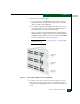
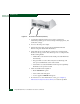
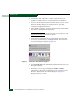
1. Remove the protective cap from the 9-pin maintenance port at the
rear of the director (a Phillips screwdriver may be required).
Connect the 9-pin end of the RS-232 modem cable to the port.
Table 2-4 Factory-Set Defaults (Intrepid 6064 Director)
Item Default
Customer-level password (maintenance port access) password
Maintenance-level password (maintenance port access) level-2
SANpilot interface user name (case sensitive) Administrator
SANpilot interface password (case sensitive) password
IP address 10.1.1.10
Subnet mask 255.0.0.0
Gateway address 0.0.0.0