
FW 07.00.00/HAFM SW 08.06.00 McDATA Intrepid 6064 Director Installation and Service Manual (620-000108-920, April 2005)


2
2-16
Intrepid® 6064 Director Installation and Service Manual
Installation Tasks
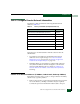
2. Connect the other cable end to a 9-pin communication port
(COM1 or COM2) at the rear of the maintenance terminal PC.
3. Power on the maintenance terminal. After the PC powers on, the
Windows desktop displays. If required, refer to operating
instructions shipped with the PC.
4. At the Windows desktop, click Start at the left side of the task bar.
The Windows Workstation menu displays.
NOTE: The following steps describe changing network addresses using
HyperTerminal serial communication software.
5. At the Windows Workstation menu, sequentially select Programs,
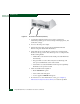
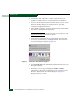
Accessories, Communications, and HyperTerminal. The Connection
Description dialog box displays (Figure 2-5).
Figure 2-5 Connection Description Dialog Box
6. Type Intrepid 6064 in the Name field and click OK. The Connect To
dialog box displays.
7. Ensure the Connect using field displays COM1 or COM2
(depending on the serial communication port connection to the
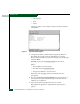
director), and click OK. The COMn dialog box (Figure 2-6)
displays (where n is 1 or 2).