
FW 07.00.00/HAFM SW 08.06.00 McDATA Intrepid 6064 Director Installation and Service Manual (620-000108-920, April 2005)


2
2-18
Intrepid® 6064 Director Installation and Service Manual
Installation Tasks
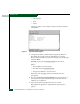
— Auto Negotiate.
— Speed.
— Duplex.
Only the IP Address, Subnet Mask, and Gateway Address fields are
configurable.
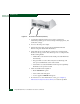
Figure 2-7 HyperTerminal Dialog Box
11. Change the IP address, subnet mask, and gateway address as
directed by the customer network administrator. To change
director network addresses, type the following at the C> prompt
and press Enter.
ipconfig xxx.xxx.xxx.xxx yyy.yyy.yyy.yyy zzz.zzz.zzz.zzz
Where:
— The IP address is xxx.xxx.xxx.xxx
— The subnet mask is yyy.yyy.yyy.yyy
— The gateway address is zzz.zzz.zzz.zzz
Where the octets xxx, yyy, and zzz are decimals from zero
through 255.
12. The message Request completed OK displays at the bottom of
the Intrepid 6064 - HyperTerminal dialog box after the network
addresses are configured.
13. Select Exit from the File pull-down menu to close the
HyperTerminal application. A HyperTerminal message box
appears.