
FW 07.00.00/HAFM SW 08.06.00 McDATA Intrepid 6064 Director Installation and Service Manual (620-000108-920, April 2005)


2
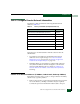
Task 4: Configure Director Network Information
2-19
Installation Tasks
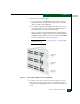
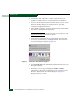
14. Click Yes. A second HyperTerminal message box appears
(Figure 2-8).
Figure 2-8 HyperTerminal Dialog Box
15. Click No to exit and close the HyperTerminal application.
16. Power off the maintenance terminal:
17. Disconnect the RS-232 null modem cable from the director and
the maintenance terminal. Replace the protective cap over the
maintenance port.
18. IML the director (IML the Director (CTP Front Panel) on page 4-54).
Subtask B: LAN-Connect the Director
To connect the director to the Ethernet LAN segment:
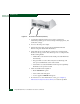
1. Connect one end of an Ethernet patch cable (two cables supplied
with the director) to the RJ-45 connector on each CTP2 card.
2. Connect the remaining end of each Ethernet cable to the LAN.
— If the director is to be installed on a customer-supplied LAN
segment, connect the cable to the LAN as directed by the
customer network administrator.
— If the director is to be installed on the McDATA-qualified
Ethernet hub, connect the cable to any available hub port.
3. Perform one of the following steps:
— If the director is delivered separately from the management
server, go to Task 5: Install the Management Server following.
— If the director is managed through the SANpilot interface,
attach the Ethernet LAN segment to an Internet connection
and go to Task 11: Configure the Director at the SANpilot Interface
on page 2-80.