
FW 07.00.00/HAFM SW 08.06.00 McDATA Intrepid 6064 Director Installation and Service Manual (620-000108-920, April 2005)


2
2-20
Intrepid® 6064 Director Installation and Service Manual
Installation Tasks
Task 5: Install the Management Server
The management server is a 1U high, rack-mount unit with the SAN
management (SANavigator or EFCM) and Intrepid 6064 Element
Manager applications installed. This task provides instructions to
unpack, install, and configure the management server.
Unpack, inspect, and install the management server.
1. Inspect the shipping container for damage caused during transit.
If a container is damaged, ensure a representative from the freight
carrier is present when the container is opened.
2. Unpack the shipping container and inspect each item for damage.
Ensure the packaged items correspond to the items on the bill of
materials.
3. If any items are damaged or missing, customers should call the
toll-free telephone number printed on the service label attached
to the bottom of the server.
4. Open the rack-mount kit and inspect the contents. Refer to the bill
of materials and verify all parts are delivered.
5. Install the management server in the equipment cabinet (1U
Server Rack-Mount Kit Installation Instructions, 958-000310).
6. Connect the management server to the customer-supplied
Ethernet LAN segment or McDATA-qualified Ethernet hub
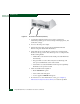
(private LAN interface). To connect the server:
a. Connect one end of the Ethernet patch cable (supplied with
the management server) to the right RJ-45 adapter (LAN 2) at
the rear of the server (Figure 2-9).