
FW 07.00.00/HAFM SW 08.06.00 McDATA Intrepid 6064 Director Installation and Service Manual (620-000108-920, April 2005)

2
Task 5: Install the Management Server
2-21
Installation Tasks
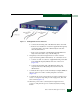
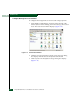
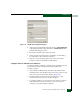
Figure 2-9 Management Server Connections
b. Connect the remaining end of the Ethernet cable to the LAN.
— If the server is installed on a customer-supplied LAN segment,
connect the cable to the LAN as directed by the customer
network administrator.
— If the server is installed on the McDATA-qualified Ethernet
hub, connect the cable to any available hub port.
7. If required, connect the management server to the customer
corporate intranet (public LAN interface). To connect the server:
a. Connect one end of a customer- supplied Ethernet patch cable
to the left RJ-45 adapter (LAN 1) at the rear of the server
(Figure 2-9).
b. Connect the remaining end of the Ethernet cable to the
corporate intranet as directed by the customer network
administrator.
8. Connect the 20-foot phone cord to the left RJ-11 adapter (LINE) at
the rear of the server and to a facility telephone connection
(Figure 2-9).
9. Connect the AC power cord to the server and to a facility power
source or rack power strip that provides single-phase, 90 to 264
VAC current (Figure 2-9).
10. When the power cord is connected, the management server
powers on and performs power-on self-tests (POSTs). During
POSTs: