
FW 07.00.00/HAFM SW 08.06.00 McDATA Intrepid 6064 Director Installation and Service Manual (620-000108-920, April 2005)

2
2-26
Intrepid® 6064 Director Installation and Service Manual
Installation Tasks
If required, change the management server gateway addresses and
domain name system (DNS) server IP addresses to conform to the
customer LAN addressing plan. The gateway addresses are the
addresses of the local router for the corporate intranet.
Access the Management Server Desktop
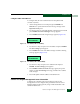
To login and access the management server desktop:
1. Ensure the management server and a PC are connected through
an Ethernet LAN segment. At the PC, launch the browser
application (Netscape Navigator
or Internet Explorer).
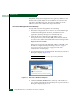
2. At the PC browser, enter the LAN 2 IP address of the
management server, followed by :5800, as the Internet uniform
resource locator (URL). Entered the URL in the following format:
http://xxx.xxx.xxx.xxx:5800
Where xxx.xxx.xxx.xxx is the default IP address of 10.1.1.1 or the
IP address configured while performing Subtask A: Configure
Password and Network Addresses on page 2-23. The VNC
Authentication screen displays.
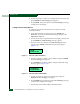
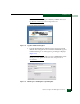
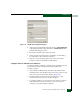
3. Type the default password and click OK. The Welcome to Windows
dialog box displays (Figure 2-15).
NOTE: The default TightVNC viewer password is password.
Figure 2-15 Welcome to Windows Dialog Box
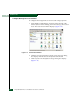
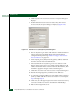
4. Click the Send Ctrl-Alt-Del button at the top of the window to
log on to the management server desktop. The Log On to Windows
dialog box displays (Figure 2-16).