
FW 07.00.00/HAFM SW 08.06.00 McDATA Intrepid 6064 Director Installation and Service Manual (620-000108-920, April 2005)

2
2-30
Intrepid® 6064 Director Installation and Service Manual
Installation Tasks
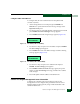
4. Click Properties. The Local Area Connection 2 Properties dialog box
displays.
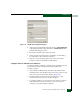
5. Double-click the Internet Protocol (TCP/IP) entry. The Internet
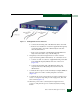
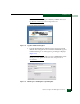
Protocol (TCP/IP) Properties dialog box displays (Figure 2-20).
Figure 2-20 Internet Protocol (TCP/IP) Properties Dialog Box
6. The Use the following IP address radio button is enabled and the IP
address and Subnet mask fields display network information
configured while performing Subtask A: Configure Password and
Network Addresses on page 2-23.
7. At the Default gateway field, enter the gateway address obtained
from the customer network administrator.
8. Select (enable) the Use the following DNS server addresses radio
button. At the Preferred DNS server field, enter the DNS server IP
address obtained from the customer network administrator, then
click OK to apply the changes and close the dialog box.
9. Click OK to close the Local Area Connection 2 Properties dialog box.
10. Record the changed gateway and DNS server addresses.
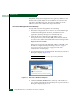
11. To optionally configure addresses for the public LAN connection
(LAN 1), double-click the Local Area Connection 1 icon and repeat
step 3 through step 10.
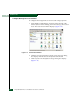
12. Click close (X) at the upper right corner of the Network and Dial-up
Connections window to return to the Windows 2000 desktop.
13. Reboot the management server: