
FW 07.00.00/HAFM SW 08.06.00 McDATA Intrepid 6064 Director Installation and Service Manual (620-000108-920, April 2005)


2
2-36
Intrepid® 6064 Director Installation and Service Manual
Installation Tasks
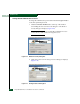
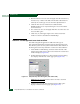
3. Based on the level of access to be changed, select the Standard user,
Restricted user, or Other radio button. If the Other radio button is
selected, choose the type of access from the adjacent list box.
4. Click OK. The new user information is added and the
MGMTSERVER\srvacc Properties dialog box closes. Record the
user information.
5. If no other users are to be changed, click OK to close the Users and
Passwords dialog box.
6. Click close (X) at the upper right corner of the Control Panel
window to return to the Windows 2000 desktop.
Subtask D: Set Management Server Date and Time
The SAN management application audit and event logs are
time-stamped with the date and time from the management server.
The director system clock is synchronized with the date and time of
the management server by default. To set the server date and time:
1. At the Windows 2000 desktop, click Start at the left side of the
task bar, then select Settings, then Control Panel. The Control Panel
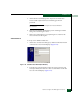
window displays (Figure 2-18).
2. Double-click the Date/Time icon. The Date/Time Properties dialog
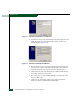
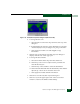
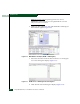
box displays with the Date & Time page open (Figure 2-29).
Figure 2-29 Date/Time Properties Dialog Box (Date & Time Tab)
NOTE: The Time Zone field must be set before the Date & Time field.
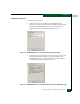
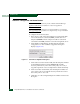
3. Click the Time Zone tab. The Date/Time Properties dialog box
displays with the Time Zone page open (Figure 2-30).