
FW 07.00.00/HAFM SW 08.06.00 McDATA Intrepid 6064 Director Installation and Service Manual (620-000108-920, April 2005)


2
2-38
Intrepid® 6064 Director Installation and Service Manual
Installation Tasks
Subtask E: Configure the Call-Home Feature
NOTE: The call-home feature may not be available if the EFC Manager
application (EFCM Lite) is installed on a customer-supplied PC.
NOTE: These steps are valid only for an initial installation. Several dialog
boxes appearing in this procedure are configured only once per installation.
To configure the call-home feature:
1. There are two jacks on the management server internal modem:
one for the call-home connection (LINE), and the other for a
telephone (PHONE). Ensure a telephone cable is routed and
connected to the LINE jack at the rear of the management server.
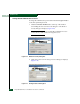
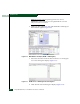
2. At the Windows 2000 desktop, double-click the Call-Home
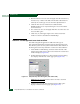
Configuration icon. The Call Home Configuration dialog box
displays (Figure 2-31).
Figure 2-31 Call Home Configuration Dialog Box
3. At the Call Center Phone Number field, enter the telephone number
for the McDATA Solution Center (720-566-3912). Include
necessary information, such as the country code, area code, or
any prefix required to access a telephone line outside the facility.
4. At the Local Phone Number field, enter the telephone number for
access to the local server. Include necessary information such as
the country code or area code.
5. Click OK to save the configured telephone numbers and close the
dialog box.