
FW 07.00.00/HAFM SW 08.06.00 McDATA Intrepid 6064 Director Installation and Service Manual (620-000108-920, April 2005)


2
Task 7: Configure Director to the SAN Management Application
2-39
Installation Tasks
Subtask F: Record or Verify Management Server Restore Information
Windows 2000 configuration information must be recorded to restore
the management server in case of hard drive failure. Ensure that the
following management server configuration information is verified
or recorded:
• Network configuration information.
— LCD panel password.
— Network addresses (IP address, subnet mask, gateway
address, and DNS server IP address) for private LAN
connection (LAN 2).
— Network addresses (IP address, subnet mask, gateway
address, and DNS server IP address) for public LAN
connection (LAN 1).
—Computer name.
• User passwords.
• Date and time information.
• Product ID number.
Task 7: Configure Director to the SAN Management Application
Perform the following tasks to configure the director to the SAN
management application (SANavigator or EFCM).
Subtask A: Assign User Names and Passwords to SAN Management Application
Users must be configured for access to the SAN management
application.
To assign user names and passwords:
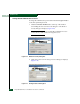
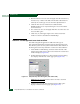
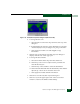
1. At the EFCM Log In or SANavigator Log In dialog box
(Figure 2-17), type the SAN management application default user
name and password and select a server or IP address from the
Network Address drop-down list.