
FW 07.00.00/HAFM SW 08.06.00 McDATA Intrepid 6064 Director Installation and Service Manual (620-000108-920, April 2005)

2
Task 7: Configure Director to the SAN Management Application
2-41
Installation Tasks
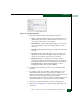
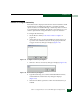
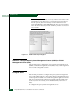
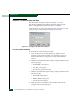
Figure 2-34 Add User Dialog Box
5. Enter information in fields as directed by the customer:
— Name - Click in this field and type a new user name up to 16
alphanumeric characters. Control characters and spaces are
not valid. The user name is case-sensitive.
— Email Address - Click in this field and type one or more new
user e-mail addresses. Separate multiple addresses with a
semicolon.
— User ID - Click in this field and type a unique user ID for the
new user.
— Password - Click in this field and type a password up to 16
alphanumeric characters in length. Control characters and
spaces are not valid. The password is case-sensitive.
— Retype Password - To confirm the password is entered
correctly, click in this field and enter the password exactly as
in the Password field. If an incorrect keystroke is entered, use
the Backspace key to delete individual letters or select
(highlight) the entire entry and press Delete.
6. To enable e-mail notification for the new user, click the Enable
check box.
7. To configure event types for which e-mail notification is sent,
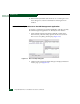
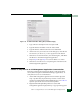
click the Filter link. The Define Filter dialog box displays. For
instructions on defining event filters, refer to the McDATA Intrepid
6140 and 6064 Directors Element Manager User Manual
(620-000153), McDATA Enterprise Fabric Connectivity Manager User
Manual (620-005001), or SANavigator User Guide (621-000013).
8. Click OK to accept the information and close the dialog box.
9. Repeat step 4 through step 8 to assign multiple user names and
passwords.