
FW 07.00.00/HAFM SW 08.06.00 McDATA Intrepid 6064 Director Installation and Service Manual (620-000108-920, April 2005)

2
Task 7: Configure Director to the SAN Management Application
2-43
Installation Tasks
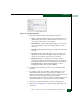
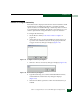
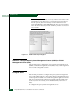
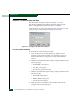
Figure 2-36 Domain Information Dialog Box (IP Address Page)
3. Type a director description in the Description field.
4. Type the director IP address in the IP Address field.
5. Type the director subnet mask in the Subnet Mask field.
6. At the Data Source for Domain area of the dialog box, select the Use
auto detection, Use the server, or Use a specific RDC radio button.
7. Click OK to save the information, close the dialog box, and define
the director to the SAN management application.
8. Repeat step 2 through step 7 for each new director or switch.
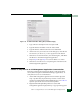
9. Click OK to close the Discover Setup dialog box and return to the
SAN management application.
Subtask C: Verify Director-to-SAN Management Application Communication
Verify the communication between the director and management
server (SAN management and Element Manager applications). To
verify director-to-server communication:
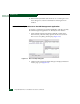
1. At the SAN management application main window (physical
map or product list), inspect the shape and color of the status
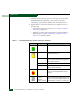
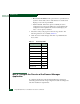
symbol associated with the Intrepid 6064 Director icon. Table 2-5
explains operational states and associated symbols.
2. Right-click the Intrepid 6064 product icon at the SAN
management application physical map. A pop-up menu appears.