
FW 07.00.00/HAFM SW 08.06.00 McDATA Intrepid 6064 Director Installation and Service Manual (620-000108-920, April 2005)

2
2-44
Intrepid® 6064 Director Installation and Service Manual
Installation Tasks
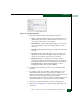
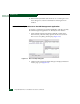
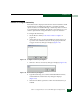
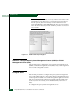
3. Select the Element Manager option from the pop-up menu. When
the Element Manager application opens, the last view (tab)
accessed by a user opens by default, such as the Hardware View.
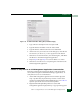
4. Inspect director status at the Hardware View and perform one of
the following:
— If the director appears operational, go to Subtask D: Configure
Feature Key on page 2-45.
— If director operation appears degraded or a director failure is
indicated, go to Chapter 3, Maintenance Analysis Procedures
(MAPS) to isolate the problem.
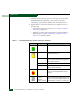
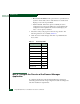
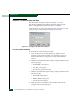
Table 2-5 Element Manager Alert Symbols, Messages, and Status
Symbol Message Description
Fully operational All components and installed ports are operational.
Redundant failure A redundant component has failed and the backup
component has taken over.
Minor failure A failure has occurred that has decreased the
director operational capability, but has not affected
normal switching operations.
Major failure Power supplies have failed.
Loading firmware The system is busy loading new firmware, but the
system is otherwise operational.
Not operational A critical failure has occurred that prevents the
director from performing fundamental switching
operations.
o Link time-out
o Protocol
mismatch
o Never connected
Director status is unknown. Occurs is network
connection between the management server and the
director is lost, or if a CTP card fails and there is no
operational backup, or if there is no system power.