
FW 07.00.00/HAFM SW 08.06.00 McDATA Intrepid 6064 Director Installation and Service Manual (620-000108-920, April 2005)

2
Task 7: Configure Director to the SAN Management Application
2-45
Installation Tasks
Subtask D: Configure Feature Key
Perform this task to display features that have been installed or install
features that are available for the director as customer-specified
options. Features are installed through a feature key that is encoded
to work with the serial number of the director. A feature key is a case-
sensitive alphanumeric string with dashes every four characters.
To configure the feature key:
1. Set the director offline (Set the Director Online or Offline on
page 4-43).
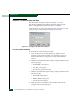
2. At the Hardware View for the selected director, click Configure at
top of the view and select Features from the pop-up menu. The
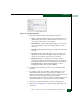
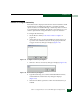
Configure Feature Key dialog box displays (Figure 2-37).
Figure 2-37 Configure Feature Key Dialog Box
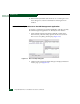
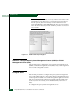
3. Click New. The New Feature Key dialog box displays (Figure 2-38).
Figure 2-38 New Feature Key Dialog Box
4. Type the feature key (case-sensitive xxxx-xxxx-xxxx-xx format)
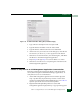
and click OK. The Install Feature Key dialog box displays
(Figure 2-39).
5. Click OK. The director performs an IPL when the feature key is
enabled.