
FW 07.00.00/HAFM SW 08.06.00 McDATA Intrepid 6064 Director Installation and Service Manual (620-000108-920, April 2005)


2
2-46
Intrepid® 6064 Director Installation and Service Manual
Installation Tasks
NOTE: PFE keys are encoded to work only with the serial number of the
installed director. Record the key to re-install the feature. If the director
must be replaced, obtain new PFE keys from the McDATA Solution
Center (800-752-4572 or support@mcdata.com). Have the serial numbers
of the old and new directors, and the old PFE key number or transaction
code available.
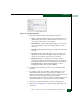
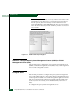
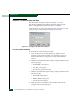
Figure 2-39 Install Feature Key Dialog Box
Subtask E: Configure Open Systems Management Server (OSMS) or FICON
Management Server (FMS)
Perform this task to configure the open systems management server
(OSMS) or FICON management server (FMS). Only one management
server can be configured at a time.
Configure OSMS
Perform this procedure to configure the open systems management
server and enable OSI host control of the director. Implementing host
control requires installation of a SAN management application on the
OSI server. Management applications include Veritas® SANPoint™
Control (version 1.0 or later), or Tivoli® NetView® (version 6.0 or
later).
To configure the open systems management server: