
FW 07.00.00/HAFM SW 08.06.00 McDATA Intrepid 6064 Director Installation and Service Manual (620-000108-920, April 2005)

2
2-48
Intrepid® 6064 Director Installation and Service Manual
Installation Tasks
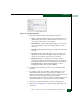
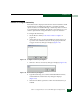
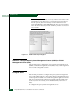
— Host Control Prohibited - This option allows or prohibits host
(S/390 or zSeries 900) control of the director. If a check mark
displays, host control is prohibited.
— Active = Saved - When this option is enabled, the active
configuration of logical port addresses is used when the IPL
configuration file is updated. If a check mark displays, the
Active = Saved option is enabled.
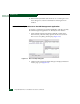
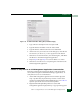
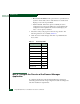
3. Select the country code page from the Code Page list box. The
following selections are available (Table 2-6).
4. Click Activate to enable changes and allow or prohibit FICON
host control.
Task 8: Configure the Director at the Element Manager
Application
To configure the director from the Element Manager application,
selectively perform the following configuration tasks according to the
customer installation requirements:
Table 2-6 Code Page Table
Code Page Name Code Page
United States/Canada 00037
Germany/Austria 00273
Brazil 00275
Italy 00280
Japan 00281
Spain/Latin America 00284
United Kingdom 00285
France 00297
International #5 00500