
HSG80 ACS Solution Software V8.6 for Compaq OpenVMS Installation and Configuration Guide

5–10 HSG80 ACS Solution Software Version 8.6 for Compaq OpenVMS Installation and Configuration Guide
❏ no parity
5. Press Enter. A copyright notice and the CLI prompt appear, indicating that you
established a local connection with the controller.
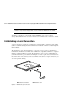
Cabling a Controller Pair
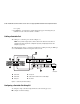
The cabling for a controller pair is shown in Figure 5–3.
NOTE: It is a good idea to plug only the controller cables into the switch. The host cables are
plugged into the switch as part of the configuration procedure (“Configuring a Controller Pair
Using CLI,” page 5–10).
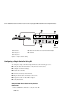
The following figure shows a controller pair with failover cabling showing one HBA per
server with HSG80 controller in transparent failover mode.
Figure 5–3. Controller pair failover cabling
Configuring a Controller Pair Using CLI
To configure a single controller using CLI involves the following processes:
■ Configure Controller Settings.
1 Controller A
2 Controller B
3 Host port 1
4 Host port 2
5 Cable from the switch to the host FC adapter
6 FC switch
CXO6887B
6
6
5
5
1
2
4
3