
HSG80 ACS Solution Software V8.6 for Compaq OpenVMS Installation and Configuration Guide

1–16 HSG80 ACS Solution Software Version 8.6 for Compaq OpenVMS Installation and Configuration Guide
Enablign the Access Path of Selected Host Connections
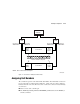
Host access can be limited by enabling the access of certain host connections and
disabling the access of others. This is done through the ENABLE_ACCESS_PATH and
DISABLE_ACCESS_PATH switches of the
ADD UNIT (or SET unit) commands. Access path is
a unit switch, meaning it must be specified for each unit. Default access means that the
unit is accessible to all hosts. It is important to remember that at least two paths between
the unit and the host must be enabled in order for multiple-bus failover to work.
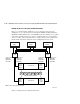
Figure 1–8. Limiting host access in multiple-bus failover mode
CXO7078B
Host
port 1
active
Host
port 2
active
Host
port 2
active
Host
port 1
active
D100 D101 D120D0 D1 D2
Host 1
"RED"
Controller A
Controller B
All units visible to all ports
FCA1 FCA2
Host 2
"GREY"
FCA1 FCA2
Host 3
"BLUE"
FCA1 FCA2
Connections
RED1B1
GREY1B1
BLUE1B1
Connections
RED2A2
GREY2A2
BLUE2A2
Connections
RED2B2
GREY2B2
BLUE2B2
Connections
RED1A1
GREY1A1
BLUE1A1
Switch
or hub
Switch
or hub
NOTE: FCA = Fibre Channel Adapter