
HSG80 ACS Solution Software V8.6 for Compaq OpenVMS Installation and Configuration Guide
1–18 HSG80 ACS Solution Software Version 8.6 for Compaq OpenVMS Installation and Configuration Guide
NOTE: All host connections to the same host computer must be set to the same offset.
For example:
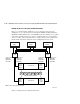
In Figure 1–8, assume all host connections initially have the default offset of 0. Giving all
connections access to host BLUE, an offset of 120 will present unit D120 to host BLUE as
LUN 0. Enter the following commands:
SET BLUE1A1 UNIT_OFFSET=120
SET BLUE1B1 UNIT_OFFSET=120
SET BLUE2A2 UNIT_OFFSET=120
SET BLUE2B2 UNIT_OFFSET=120
Host BLUE cannot see units lower than its offset, so it cannot access any other units.
However, the other two hosts can still access D120 as LUN 20 if their operating system
permits. To restrict access of D120 to only host BLUE, enable only host BLUE’s access,
as follows:
SET D120 DISABLE_ACCESS_PATH=ALL
SET D120 ENABLE_ACCESS_PATH=(BLUE1A1,BLUE1B1,BLUE12A2,BLUE2B2)
NOTE: Compaq recommends that you always provide access to only specific connections. This
way, if new connections are added, they will not have automatic access to all units. See
“Restricting Host Access in Multiple-Bus Failover Mode,” page 1–15.
Worldwide Names (Node IDs and Port IDs)
A worldwide name—also called a node ID—is a unique, 64-bit number assigned to a
subsystem prior to shipping. The node ID belongs to the subsystem itself and never
changes.
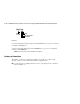
Each subsystem’s node ID ends in zero, for example 5000-1FE1-FF0C-EE00. The
controller port IDs are derived from the node ID.
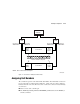
In multiple-bus failover mode, each of the host ports has its own port ID:
■ Controller B, port 1—worldwide name + 1, for example 5000-1FE1-FF0C-EE01
■ Controller B, port 2—worldwide name + 2, for example 5000-1FE1-FF0C-EE02
■ Controller A, port 1—worldwide name + 3, for example 5000-1FE1-FF0C-EE03
■ Controller A, port 2—worldwide name + 4, for example 5000-1FE1-FF0C-EE04