
HSG80 ACS Solution Software V8.6 for Compaq OpenVMS Installation and Configuration Guide


Installing and Configuring the HS-Series Agent 4–5
■ Immediately start or stop your Agent.
■ Start your Agent automatically each time the host is started (This is the only mode
available for TCPware and MultiNet).
■ Start your Agent as an auxiliary service of TCP/IP Services for OpenVMS (default). It
starts Agent on demand.
Before Installing the Agent
1. Verify that you have one of the following:
❏ TCP/IP Services for OpenVMS (version 5.0 or later) with FTP and Telnet utilities
enabled
❏ TCPware (version 5.2 or later)
❏ MultiNet TCP/IP for OpenVMS (version 4.0 or later)
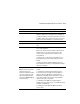
2. Your OpenVMS host’s resources must meet the minimum requirements specified in
Table 4–3.
3. Remove previous versions of the Agent from your computer.
If you are removing the Agent version 1.1b, delete the file, change_register.com, from
the SYS$SYSDEVICE:[SWCC$AGENT] directory.
4. Read the release notes that are in the file, HSG80VMS.TXT.
5. If you have OpenVMS version 7.2-1 on an Alpha computer with MultiNet and/or
TCPware TCP/IP stacks, you must install the security patch from the Process Software
Website at
http://www.process.com.
6. If you have an HSJ40 controller, check the controller firmware revision level. If your
controller is at version 3.2J you must upgrade to version 3.4J before installing the
Agent. This is due to an issue with the 3.2J firmware that causes controller hangs
intermittently when used with the Agent.
Table 4–3 Minimum OpenVMS Host Requirements
Host Feature Requirements
Architecture Alpha server with 3000 blocks of free space on system disk
Operating System OpenVMS version 7.2-1 with Remedial Kits installed