
HSG80 ACS Solution Software V8.6 for Compaq OpenVMS Installation and Configuration Guide

Installing and Configuring the HS-Series Agent 4–9
9. If you have an OpenVMS cluster running the MultiNet TCP/IP stack, the command
procedure SWCC_CONFIG.COM will only upgrade the services of each system
disk’s first node. Enter the following to upgrade the services database of the other
nodes that share the system disk:
$ @MULTINET:INSTALL_DATABASES
or
Restart the system.
10. Dismount the CD-ROM. Enter the following at the command prompt and then press
Enter (The following example assumes that your CD-ROM drive is DKB600.):
$ DISMOUNT DKB600:
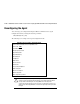
11. Run the configuration program. Enter the following at the command prompt:
$ @SYS$MANAGER:SWCC_CONFIG
If the installation does not detect any configuration files from a previous installation,
you are shown a configuration script when you run the configuration program. During
the configuration, you will need to do at least the following:
❏ Enter the name of the client system on which you installed the Client software. You
can enter more than one client system. For a client system to receive updates from
the Agent, it must be on the Agent’s list of client system entries. In addition, adding
a client system entry allows you to access the agent system from the Navigation
Tree.
NOTE: Enter your most important client system first and the client system that is infrequently
connected to the network last. The software will put the client system entry that you entered
first to the top of its list of client systems to be contacted.
❏
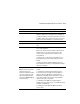
Enter client system notification options and the client system access options. For a
definition of the client system notification options and the client system access
options, see Table 4–3.
❏ Enter the name for a subsystem and the device name used to access the subsystem.
You can enter more than one subsystem. If you want to monitor and manage a
subsystem, you need to enter this information. The subsystem, which is comprised
of the controller and its array of physical devices, must have access to the Agent
system.
❏ Enter a password. It must be a text string that has 4 to 16 characters. It is entered
from the client system to gain configuration access.
❏ Start the Agent. The Agent runs as a process in the background. When you start the
Agent, you are instructing the software to start monitoring the subsystems.