
HSG80 ACS Solution Software V8.6 for Compaq OpenVMS Installation and Configuration Guide


4–10 HSG80 ACS Solution Software Version 8.6 for Compaq OpenVMS Installation and Configuration Guide
Reconfiguring the Agent
You can change your configuration using the SWCC Command Console Agent
Configuration menu by entering the following command:
$ @sys$manager:swcc_config
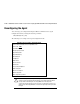
The following is an example of the Agent Configuration menu:
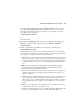
CAUTION: After you make a change to the configuration, such as adding a client
system, you must stop and then start the Agent for your changes take effect. When
you stop and then start the Agent, the Storage Windows for the subsystems
connected to the agent system lose their connection. To regain that connection, close
and then reopen the Storage Windows connected to the agent system after you restart
the Agent.
SWCC Agent for HS* Controllers Configuration Menu
Agent is enabled as TCP/IP Services for OpenVMS service.
Agent is now: active
Agent Admin Options:
1)Change Agent password
2)Agent Enable/Start
3)Agent Disable/Stop
4)Uninstall Agent
Client Options:
5)Add a Client
6)Remove a Client
7)View Clients
Storage Subsystem Options:
8)Add a subsystem
9)Remove a subsystem
10)View subsystems
E)Exit configuration procedure