
HSG80 ACS Solution Software V8.6 for Compaq OpenVMS Installation and Configuration Guide


Installing and Configuring the HS-Series Agent 4–11
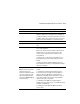
Table 4–4 Information Needed to Configure Agent
Term/Procedure Description
Adding a Client system entry For a client system to receive updates from the Agent, you must
add it to the Agent’s list of client system entries. The Agent will
only send information to client system entries that are on this list.
In addition, adding a client system entry allows you to access the
Agent system from the Navigation Tree on that Client system.
Adding a subsystem entry You need to tell the Agent the subsystem that it needs to monitor.
Client system Network names for the computers on which the Client software
runs.
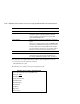
Client system access options The access privilege level controls the Client system’s level of
access to the subsystems.
0=No Access
−Can use the Client software to add a system to a
Navigation Tree, set up a pager, and view properties of the
controller and the system. You cannot use Client to open a
Storage Window.
1=Show Level Access
−Can use the Client software to open a
Storage Window, but you cannot make modifications in that
window.
2=Storage Subsystem Configuration Capability
−Can use the
Client software to make changes in a Storage Window to modify a
subsystem configuration.
Client system notification options
Note: For all of the client system
notification options, local
notification is available through an
entry in the system error log file
and Email (provided that Email
notification in PAGEMAIL.COM has
not been disabled).
0 = No Error Notification
−No error notification is provided over
network.
1 = Notification via a TCP/IP Socket (Transmission Control
Protocol/Internet Protocol)
−Updates the Storage Window of
subsystem changes provided AES is running. Required for
Windows NT event logging and pager notification. If you do not
select TCP/IP, you will need to refresh the Storage Window to
obtain the latest status of a subsystem.
2 = Notification via the SNMP protocol (Simple Network
Management Protocol)–Requires you to use an SNMP-monitoring
program to view SNMP traps.
3 = Notification via both TCP/IP and SNMP–Combination of
options 1 and 2.