
HSG80 ACS Solution Software V8.6 for Compaq OpenVMS Installation and Configuration Guide


4–12 HSG80 ACS Solution Software Version 8.6 for Compaq OpenVMS Installation and Configuration Guide
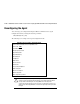
You can change your configuration using the SWCC Agent Configuration menu. To
access this menu, enter the following command:
$ @sys$manager:swcc_config
The following is an example of the Agent Configuration menu:
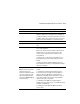
Deleting a client system entry When you remove a client system from the Agent’s list, you are
instructing the Agent to stop sending updates to that client
system. In addition, you will be unable to access this agent
system from the Navigation Tree.
Email notification Modify file pagemail.com in directory sys$manager. System is the
default.
When an error is logged, the Agent executes the PAGEMAIL.COM
command. You can modify this file for Agent to log errors in a log
file and/or change the account to which Agent sends messages.
You can also modify for which level of errors you will be notified.
Client does not need to be running to perform these actions.
Monitoring interval in seconds How often the subsystem is monitored.
Password It must be a text string that has 4 to 16 characters. It can be
entered from the client system to gain configuration access.
Accessing the SWCC Agent Configuration menu can change it.
SWCC Agent for HS* Controllers Configuration Menu
Agent is enabled as TCP/IP Services for OpenVMS service.
Agent is now: active
Agent Admin Options:
1)Change Agent password
2)Agent Enable/Start
3)Agent Disable/Stop
4)Uninstall Agent
Client Options:
5)Add a Client
6)Remove a Client
Table 4–4 Information Needed to Configure Agent (Continued)
Term/Procedure Description