
HSG80 ACS Solution Software V8.6 for Compaq OpenVMS Installation and Configuration Guide


Installing and Configuring the HS-Series Agent 4–13
Removing the Agent
Instructions on how to remove the HS-Series Agent from OpenVMS are the following:
CAUTION: Do not uninstall the Agent if you want to preserve configuration
information. If you only want to install an upgrade, stop the Agent, and then install the
new version. Older versions will be automatically removed before the update, but all
configuration information will be preserved.
1. Enter the following at the command prompt:
$ @sys$manager:swcc_config
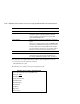
The Configuration menu appears.
2. To remove the Agent, select option 4.
3. Select option Y. The host tells you that the Agent has been stopped and SWCC is being
disabled. You are then asked if you want to continue.
4. Select option Y.
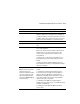
NOTE: This option does the following:
Stops all instances of the Agent on all cluster nodes
Deletes all Agent files, except the .PCSI file used to install the Agent.
7)View Clients
Storage Subsystem Options:
8)Add a subsystem
9)Remove a subsystem
10)View subsystems
E)Exit configuration procedure
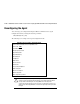
SWCC Agent for HS* Controllers Configuration Menu