
Thunderbolt Add-in Card Installation


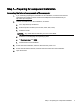
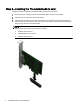
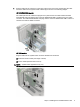
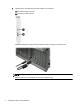

Table of contents
Thunderbolt Add-in Card Installation .................................................................................................................... 1
Introduction ........................................................................................................................................... 1
Kit contents ........................................................................................................................................... 1
Warnings and cautions ......................................................................................................................... 2
Step 1—Preparing for component installation ...................................................................................... 3
Accessing the internal components of the computer ........................................................... 3
Step 2—Installing the Thunderbolt add-in card .................................................................................... 4
Step 3—Reassembling the computer ................................................................................................... 7
Step 4—Loading the Thunderbolt add-in card driver ........................................................................... 7
iii