
Thunderbolt Add-in Card Installation


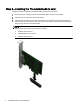
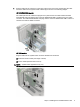

4. Plug the cable into the connector on the upper right corner of the card, and then plug the other
end of the cable into the system board connector(s) as shown in the following images:
HP Z420/Z620/Z820 models:
The cable splits into two cables that plug into the system board. The cable header with three
wires labeled C26 plugs into the blue connector labeled P26 USB 2.0 DASH next to the yellow
connector. The cable header labeled C25 plugs into the connector labeled P25 USB 2.0 which is
closest to the USB 2.0 DASH connector.
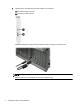
HP Z230 models:
Plug the cable into the system board connector labeled E102 as follows:
(1) Small form factor models (near edge of board)
(2) Tower models (between slots 3 and 4)
NOTE: System board appearance may vary.
Step 2—Installing the Thunderbolt add-in card 5