
ACC HDLC-NRM (SDLC) User's Guide




Chapter 2 25
Software Installation and Verification
Installation Verification
Verification Procedure
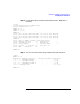
The procedure described involves using the zmlog, ttgen, zmntr,and
zterm utilities. These utilities are described in the ACC Utilities
Reference Guide.
Step 1. Modify the Bus:Slot[slot] terms in the Interface-Definition statement in
the /opt/acc/cfg/hdlcnrm_sample.answ file if necessary, to reflect the
actual location of the ACC Mux cards. Also modify the <card-type> term
to reflect your s pecific card type (replace <card-type> with z7400a, f or
example.) Refer to Chapter 4 , “Protocol Specific Configuration,” of this
manual for information on how to modify these statements.
Step 2. Thesamplefileonlyconfiguresthefirsttwoportsofonemuxcard.If
desired, expand the configuration file to include additional ports.
NOTE For the test described here, the ports that will be connected together via
a loopback cable must have one port configured with primary stations,
and the other with secondary stations. The mux ports must also have one
set to internal clocking and the other to external clocking.
In the sample configuration file, the even ports are set to internal
clocking and the odd ports are set to external clocking. (Note that the
ports a re numbered 0 to 7.) Also note t hat t he loopback cable must be
connected so t hat t he e nd marked “Int” is connected to the port
configured for internal clocking.
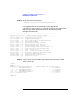
Step 3. Run ttgen on the modified .answ file.
% ttgen -o hdlcnrm_sample.answ hdlcnrm_sample.tmem
ttgen: END$ 0 Disasters, 0 Errors, 0 Warnings
%