
ACC Installation and Configuration Guide



58 Chapter3
Protocol Configuration
Firmware Related Files
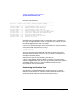
If an application program also makes use of the zmlog utility for logging
its messages, its text file should also be placed in this directory.
Files in /opt/acc/sys
This directory contains all relocatable (zrel) files related to the ACC mux
kernel software for the various ACC interface cards. These files mus t be
in this directory, and they should not be altered.
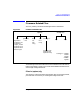
Files in /opt/acc/<card-type>/
The directories /opt/acc/<card-type> contain the zabs, zlnk,andzmap
files specific to the type of card as indicated by the directory name. The
valid directory names are:
• /opt/acc/z7200a/
• /opt/acc/z7300a/
• /opt/acc/z7340a/
• /opt/acc/z7350a/
• /opt/acc/z7400a/
The ACC base product ships t he files loopback.zabs, loopback.zlnk,and
loopback.zmap in these directories. A description of each file follows.
The loopback.zabs file is created when the zlink utility is run on the
/opt/acc/<card-type>/loopback.zlnk file. This file is the downloadable
firmware file which contains just the loopback protocol, and is the file
that is referred to in the ttgen configuration file. The what utility can be
used to identify what protocols are contained in this file.
When new protocol accessory products are installed on the system, new
.zlnk files can be created to include these protocols. These new .zlnk files
should have the .zabs files be created in this directory (see “Creating a
Downloadable Firmware File” for information on creating a .zabs file).
The loopback.zlnk file is provided with the ACC product. It includes
just the testprot.zrel loopback and monitor.zrel monitor protocols. The
zlink utility can be used on this file to create a downloadable firmware
file.
This file can be used as a template .zlnk file. When new protocol module
products are installed, a new .zlnk file should be created (see “Creating a
Downloadable Firmware File” on page 60 to create a new .zlnk file).