
ACC Installation and Configuration Guide



Chapter 3 63
Protocol Configuration
Creating a ttgen Configuration File
Creating a ttgen Configuration File
The ttgen configuration file configures how the ACC MUX cards will b e
used. The ACC p rotocol accessory products may provide a template
configuration file. If none is provided, /opt/acc/cfg/loopback.answ (afile
which is created when the ACC product is installed) can b e used. (Note
that this file is shown in Appendix A , “Files, Utilities, and Daemons,” on
page 75.) The ttgen configuration files are typically located in the
/opt/acc/cfg directory.
The loopback.answ file name should only be used for files that are
created using the acc_bl d_lpbk script per t he following:
%cd /opt/acc/cfg
%/opt/acc/lbin/acc_bld_lpbk -o loopback.answ -t sample_header\
-p loopback
The “TTGEN - ZCOM System Table Generator” chapter of the ACC
Utilities Reference Guide should be consulted for details on what each of
the configuration fields mean and how they should be set. The manuals
provided with the ACC protocol accessory products should also be
consulted for protocol-specific configuration requirements.
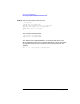
Once the ttgen configuration file is created, ttgen must be run, for
example:
% cd /opt/acc/cfg
% /opt/acc/bin/ttgen -o loopback.answ loopback.tmem
ttgen: END$ 0 Disasters, 0 Errors, 0 Warnings
%
The ACC MUX subsystem can now be brought up using this new .tmem
file. The /opt/acc/cfg/zmasterd_list should be updated with the new
.tmem file that will be used. The zmasterd daemon will then use this file
inthecasethatthezmon daemon terminates unexpectedly and needs t o
be restarted.