
ACC Installation and Configuration Guide





Appendix C 97
ACC Service Guard Configuration Notes
Overview
4. Edit the Service Guard cluster control script to start and configure
the ACC cards when the script is entered as start.Anexampleofa
start sectionisprovidedattheendofthislist.
5. Edit the Service Guard cluster control script to dis able the ACC port
and possibly shutdown AC C when the script is entered as stop.An
example of a stop section is also provided.
Examples
Here are some examples of sections from a Service Guard cluster control
script. In these examples, there is one ACC card and the ACC example
file names. In addition, RS-232 / V.35 mode is assumed for active and
inactive is LBACK (tri-state) mode. Note, these additi ons should be in
the customer defined functions section of the Servi ce Guard cluster
control script.
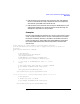
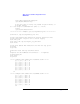
# This function is a place holder for customer define functions.
# You should define all actions you want to happen here, before the service is
# started.
# ADD customer defined run commands.
#
# ACC subsystem
syslog_msg Starting ACC subsystem
/opt/acc/bin/zmasterd
# Add SNAPlus2 initialization commands here
syslog_msg Send init commands to SNAPlus2 ports
# a 5 sec sleep is recommended here (SR # 5000-716977)
sleep 5
# The zterm utility calls axin API to execute commands
# See example "setRS232.zterm" script below.
#
syslog_msg Resetting SNAPluss2 ports
/opt/acc/bin/zterm /opt/acc/cfg/setRS232.zterm
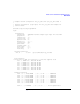
********************* control script "stop" section ************
# ACC subsystem
# disable the ports to "lback"
# See example "setLBACK.zterm" script below.
/opt/acc/bin/zterm /opt/acc/cfg/setLBACK.zterm