
ACC Utilities Reference Guide

106 Chapter4
ZMNTR - ZCOM Runtime Monitor
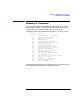
Commands
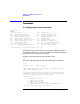
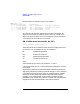
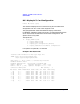
The following is an example using an X.25 modifier.
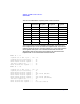
ZMNTR> dcv 10 310
Zlu# Mx p:sc Tmnl.type...... Configuration............................
0100 00 0V01 X25.SVC.IN VC=0000 #=226633011 X.25 SVC in from 33011
0200 00 1V01 X25.SVC.AUTO VC=0000 #=226633011 X.25 XVC out to 33011
0300 00 0V02 X25.SVC.IN VC=0001 #=No address L3 svc
0301 00 0V02 X25.SVC.IN VC=0002 #=No address L3 svc
T1 is the value of the timer configured in the “select” parameter, # is
either the X.25 number that will be called, or the X.25 number from
which cal ls will be accepted. For more information on the format of the
X.25 information, see under the TT command.
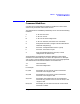
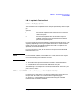
EN - Enable terminals (and DI, AC, DE)
Format: EN,mm,nn or ’DI’, ’AC’, ’DE’
These commands control the state of the terminals ranging from mm to
nn inclusive. If nn is omitted then only mm is affected.
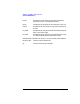
DI- Disables the terminals.
EN- Enables the terminals.
DE- Deactivates the terminals.
AC- Activates the terminals.
Notes:-
These commands can use the X.25 modifiers L, V, and O.
A DI command will abort a ny untransmitted data destined for terminals
in the range.
Some terminal types go into the “Deactivated” state during the time an
application program is processing a received message. If an AC command
is issued during this time the terminal can generate another message
which may cause a sequencing problem in the application program.
Normally an AC command will not be necessary unless it has been
preceded by a DE command or if there is a problem with the application
program and it fails to automatically reactivate the terminal.